I am returning after many months away. I decided to run through the Japanese Basics lessons again. After going thru a few topics I decided to do a quiz for the Simple Questions topic.
I was presented with 65 questions. That's absurd. What's more absurd is that I can't find how to limit the number of questions anywhere. And I have been a life member for a couple of years and have tried multiple times to understand how any of this system works.
I apologize for my frustration, but to be honest I have always found renshuu's quiz / lesson controls ridiculously complicated. "I want to limit all quizzes to no more than 10 questions, for all topics, for all question types, forever" shouldn't be so hard for me to figure out.
This is not absurd. This is how spaced repetition works. Each card is scheduled for a date in the future. If you don't study it on that day, you end up creating a backlog. After taking many months off, you're lucky you don't have hundreds of reviews. You're supposed to come back to do your reviews daily. Even then, it's normal to end up with 60 per day, depending on your new cards per day settings. You'll have the same problem with Anki or any other spaced repetition system.
As for limiting yourself to 10 questions, that's a bad idea. You're essentially just hiding the problem that way. The reviews will still pile up in the background, and you'll constantly forget your terms. That said, you can do it.
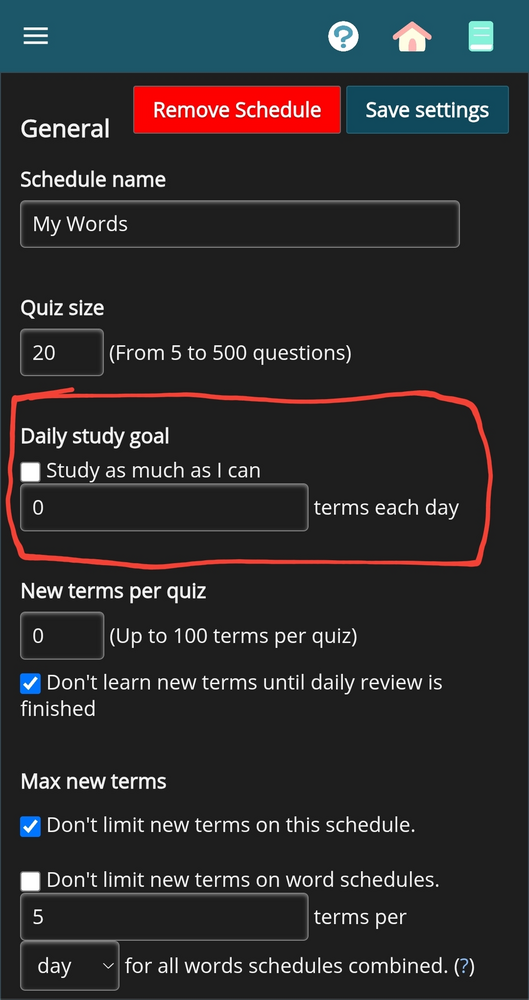
Go to your mastery schedules, hit the 3 dots next to any of them, and select settings, more settings. You can set a daily study goal here. This only applies to whatever mastery schedule you selected. There is, to my knowledge, NO way to set this globally, and for good reason.
As for limiting yourself to 10 questions, that's a bad idea. You're essentially just hiding the problem that way.
I would argue the opposite. Setting the "Daily study goal" really low is probably not the best idea, since there isn't really any harm in having a large quantity there. However, I think setting a low "Quiz size" is fine and probably good for most people. A small quiz size is less intimidating, and faster to complete, which should make doing those quizzes easier and less mentally taxing. Setting the quiz size small doesn't hide anything and doesn't really result in any additional terms backing up because you can just do multiple quizzes.
I personally set my daily review size to 60, and the quiz size to 15 (for vocab) and then just do multiple quizzes throughout the day whenever I've got time.
As for limiting yourself to 10 questions, that's a bad idea. You're essentially just hiding the problem that way.
I would argue the opposite. Setting the "Daily study goal" really low is probably not the best idea, since there isn't really any harm in having a large quantity there. However, I think setting a low "Quiz size" is fine and probably good for most people. A small quiz size is less intimidating, and faster to complete, which should make doing those quizzes easier and less mentally taxing. Setting the quiz size small doesn't hide anything and doesn't really result in any additional terms backing up because you can just do multiple quizzes.
I personally set my daily review size to 60, and the quiz size to 15 (for vocab) and then just do multiple quizzes throughout the day whenever I've got time.
I interpreted it as 10 questions in total per day. I absolutely agree with you. Limiting the quiz size is fine. I have mine set to 20. Limiting questions per day isn't a good idea.
The best way to handle a large backlog is to set all schedules to review-only, pausing the introduction of new terms for a while. Once the SRS review counts naturally die down to a pace you're comfortable with, then you can start introducing new terms again.
The thing is I already finished the schedule months ago. I just wanted to quick brush up by going thru all Japanese Basics lessons and doing a quick (10-item) quiz for each one. I don't see any way to do that now that the schedule is complete. And I don't want to reset it and have to do all of it again.
The thing is I already finished the schedule months ago. I just wanted to quick brush up by going thru all Japanese Basics lessons and doing a quick (10-item) quiz for each one. I don't see any way to do that now that the schedule is complete. And I don't want to reset it and have to do all of it again.
So like I said, Renshuu like any SRS expects you to come back to review your terms daily. You CAN retire old material, but I would only retire words you're very very confident you'll never forget, personally. Finishing a schedule just means you've seen all the terms. You haven't necessarily committed them to memory permanently.
But there are ways to do a quick quiz. You can go into the settings for the schedule and set your quiz size to 10. If you have a backlog of 100, you'll do a 10 question quiz and have a backlog of 90 afterwards. You can continue doing quizzes or choose to stop for the day.
Another method is to do a focused review. When you start a focused review, there's a quiz size setting before the quiz starts. Set it to 10 and you're good to go. But focused reviews don't increase mastery, so you can't use them to deal with a backlog or to progress your terms. I'm also not sure if you can start a focused review if you have a backlog.