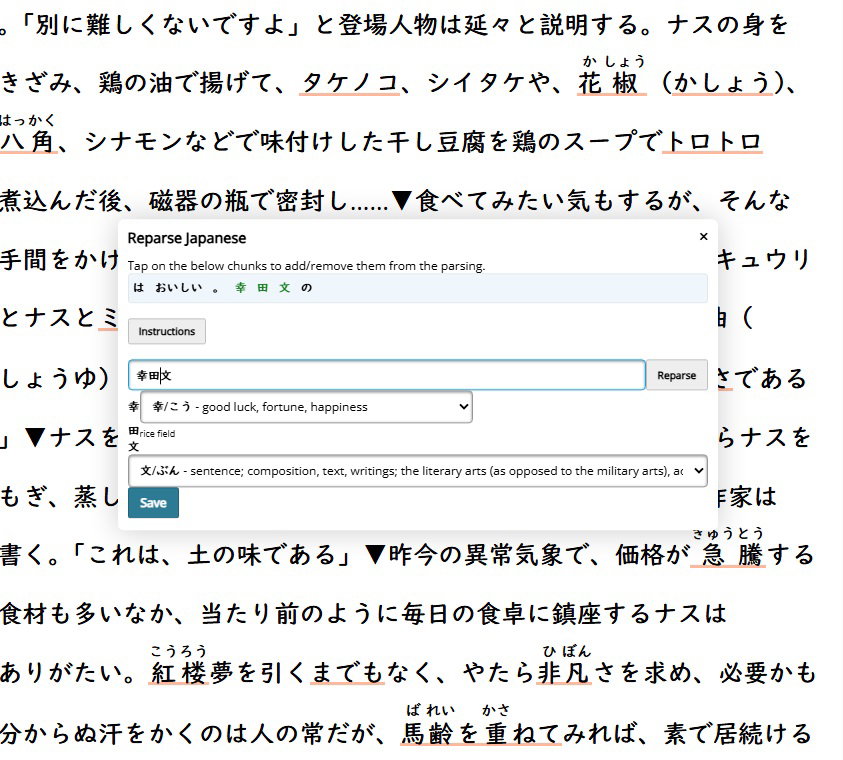
When I try to reparse names, it just splits the letters back apart again (幸田文 becomes 幸田文 after hitting reparse). I wish there was a setting when reparsing to click that it's a name and treat them separately. Right now, unknown words are red, so even when a name is in katakana (those i can reparse and stick together) it will stay red if I decide not to learn it. It would be nice if there was an option to set a name as a name maybe even have it in a different color since it's not necessarily an unknown word(maybe blue?).
Is there a way to bookmark which line I'm on as well? Like if I had a longer text that I was reading, and I don't have time to finish in one sitting. I find myself wishing I could mark or highlight which line I'm currently on so that I can come back to it later.
I gave the brackets a try and put brackets around a name but noticed,
1. They are still a bright red that feels fairly distracting when reading a longer piece.
2. It didn't update any future instances of that name. Even after refreshing and even after editing the text and saving (this actually undid the ones I did manually put in brackets). it didn't update future instances. I tried putting brackets around all instances of the name by using a text editor to replace 'name' with '[name]' and then putting it back in the text analyzer but that didn't work. I guess that makes sense since some texts might use brackets for regular bracket purposes. What's interesting though, is that in the parsed text, I don't see the brackets around the name. I just see the letters '美弥子' parsed as 3 separate words.