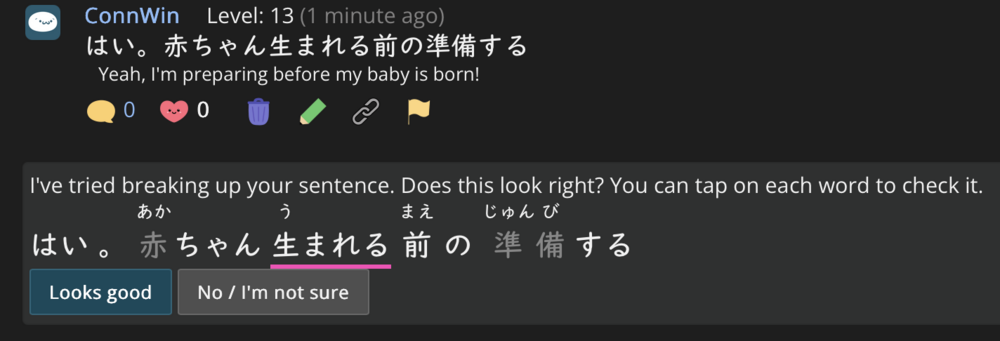
A few times when I’ve commented on the quick questions, when I click post, a little box will pop up and say something like “I tried to breakdown your comment, does this look right?” And proceeds to show me my exact comment without any changes whatsoever. Is that normal? Am I missing something? What is the purpose of this? I don’t think it’s happened every time
It’s a new feature. Soft launch, apparently, since I don’t remember seeing any announcements. When people don’t link the words in their sentences, this tries to do it for them. It does seem to be slightly smarter than the previous parser, but it’s not perfect.
Assuming it is the word garden, question corner, or haiku, when you click on the words in your sentence that asks if the words it translated makes sense it is to ensure that it doesn't mistaken a word for what you want to say.
Thanks for the followup! Yes - so what this does is not try to change anything, but rather, split up all the words in your sentence and bind them to the appropriate dictionary terms. This makes it so that others can, when viewing your comment, tap on the word for definition info, audio, add words to their schedules, and everything else you can do when looking at sentences on renshuu :)
It wants to bind the sentence to the dictionary and is asking if you agree with its parsing and vocab choice. You could do that yourself by tapping the chain icon or, if you agree with the suggestion, simply tap "looks good" and get it done even quicker.