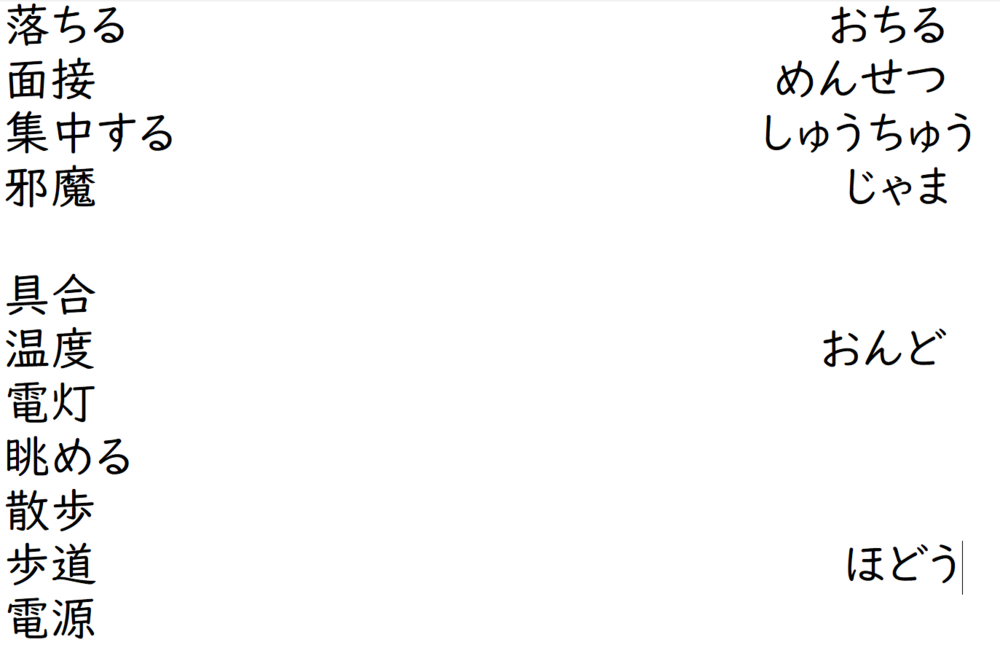
I just decided to share something I started doing during my vocabulary 復習 sessions. The main point here is to have a simple note file on your computer where you'll add a few words while you go through the quizzes on Renshuu. Here's a picture for reference.
I'll throw some bullet points now to try to explain how I use this.
1) "So, what words do you add to this file?"
Words I couldn't remember
Words I fancy (because why not)
Words I remembered, but I somehow feel like they could have got me offguard at another moment.
Other words containing a given 漢字, which might help remembering its reading, other readings or even simply other words containing said 漢字. If you're particularly confident about a reading, you can just leave only the 漢字 on the left.
New words of the day. You can easily create sections for these by putting an extra line both at the top and at the bottom, so you'll recognise these "new words" areas quickly.
EXTRA: if you're writing verbs, and you'd like to have both the transitive and intransitive form close to each other, make sure to keep the same pattern at all times to avoid confusion (either TR・INTR or viceversa).
2) "What's up with the formatting?"
Yes, the gap between the 漢字 and the readings is key here. This way you can easily hide the readings by moving the window of the note file on the side of your screen, so you won't be able to cheat even if you wanted to.
3) Is this a file you save and store forever?
No, it isn't. The point here is to add some words as you go through the daily quizzes as you see fit, save it and then reopen it sometimes later as an extra 練習. After you're done with said extra 練習, just select everything > Delete > Save and close. Next time you'll start from a blank slate with the same file, and you'll add some words again with the same criteria explained in point 1).
Oh fun one You could also use it at the end of quizz to quickly add a few sentences in another schedules for extra practice around the problematic words. Or the word you like. Or a secondary word schedules for the kanji whose meaning or readings are still not stable (a support schedule with to go through quickly). Or also browsing the dictionary/sentences. Just taking some time after a quizz can "unlock" some words/kanji by understanding a single detail. No need to always plan additional review. I often do that with kanji for example. But one day before the quizz. Like I often browse the words that use a particular kanji to try to understanding the general or main meaning. Because the translation often shower you with meaning you don't need or are too rare and just useless even for japanese. It's doing its job as a "bilingual dictionary" but when you're learning, it's just... the worse x). At some point, I was so annoyed, I change the definition ("translation") of a few hundred kanji by removing everything except one or two words. It didn't cover everything but I was never able to remember everything to begin with. Still can't. Ask me all the definitions ("translations") of 掛ける and I won't be able to answer you (even if I'm able to use it).
Anyway, I'm getting off track Thanks for sharing! =p
Shamugan (07月1日, 15:02)
Oh fun one You could also use it at the end of quizz to quickly add a few sentences in another schedules for extra practice around the problematic words. Or the word you like. Or a secondary word schedules for the kanji whose meaning or readings are still not stable (a support schedule with to go through quickly).
This is a really good advice actually, thank you! Sometimes I save the most interesting sentences in a separate word file too, but populating a new schedule with said sentences sounds useful indeed. I'll give it a try!
Just curious, what program and font is that? It looks cool
Also, I'll be sure to try out this method in the future!
The program is the standard "Notes" from Windows, the one which saves txt files. Nothing fancy
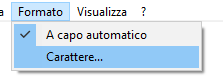
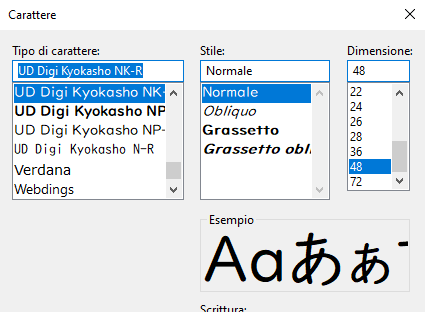
About the font, you can change the default one and size easily if you're planning to use the same software.
The UI is in Italian, but should be fairly understandable still. Of course, any other software which allows you to make a wide window to create the gap between the 漢字 and the furiganas will do the job.
Happy to help! There are a lot of small details like that can pile up over the years and that is the "best method" imo. A custom one based on personal preference, lifestyle, etc. Rather than generic "best method". Which can be the worst method for some people simply because of their lifestyles or even their personalities.
Anyway, just to say, I'm happy when people share small "tricks" like that. I even find a few good that I can use in my routine from time to time :3 I wish there more discussions like that on renshuu's forum but oh well...
Happy to help! There are a lot of small details like that can pile up over the years and that is the "best method" imo. A custom one based on personal preference, lifestyle, etc.
Oh yeah definitely. To be fair sometimes I don't even complete the review of this file in the same day. Sometimes the next one, another time I just delete it and start again from scratch cause it's late and/or I don't feel like it. But what I like about this method is that it forces you to type words multiple times, and since this is not a file where you keep adding stuff, but you reset quite often, you just keep doing it.
At first, I also had doc files I made for vocabs, but then I realised I never went back to those and it took me too much time. Different story for grammar, it's quite handy to come back to my notes when I have doubts. 漢字 mmh, I like the idea of having files where I type the readings and words nice and tidy, but when I review them I just use the app and go through the terms of a schedule usually. I do keep notes of vocabs and grammar I find in games/movies and so on though, as a separate thing.
I've been making notes on my mobile device I primarly use, but mainly for the grammar side of things, and it comes with extra steps. Each note file is basically its own topic...which gets a little disorganized after a while. And there's enough of them to need some cleaning up. Especially since some have some cross between them at times. Its a bit of a mess, but I have a basic format.
While I'm kind of on a study hiatus, I figured I'd resume a project of taking these notes and trying it into a book to organize it. I finally got around to figuring out how to upload them in bulk into a text file which somehow miraculously never lost the formatting. I'm gonna stick with that. I used to have to remotely cut and paste each file, which loses a bunch of the firmatting I wanted. Also, it's because I'm using Word 97, a part of the only software suite I use on other machines for portability, and I don't have restrictions on using it. The downside is there's no way I can get furigana, so I'm adapting.
It's still in the WIP phase of things, as I'm trying out stuff, but I found that way of things has worked for me to make it easier to reference. I've come across so much stuff for research in this learning process, that it gets rough trying to navigate and get the right picture. I'm taking the initiative to fix that, and still do what I do.
Also, it's because I'm using Word 97, a part of the only software suite I use on other machines for portability, and I don't have restrictions on using it. The downside is there's no way I can get furigana, so I'm adapting.
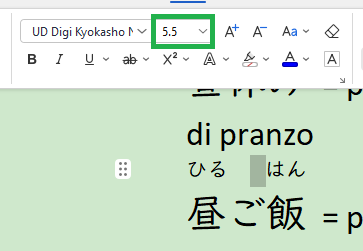
Not sure if this can help, but when I add furiganas in my notes in general I just add those in an extra line on top and make the font tiny (7.5-8) compared to the size of the standard text below (12). Now that it's above, you can also move it as little as you can with a trick. Insert a blank space before the furigana you're moving. Now select said blank space and change the size of the font. This way, you'll be reducing only the size of the empty blank space, and it's quite useful to place the furiganas on top of the 漢字 with more precision. In the picture below I went from 7.5 to 5.5 to get the desired effect.
As an all purpose word editor, I often use WPS for taking "serious" notes. The base version it's free.
Also, it's because I'm using Word 97, a part of the only software suite I use on other machines for portability, and I don't have restrictions on using it. The downside is there's no way I can get furigana, so I'm adapting.
Not sure if this can help, but when I add furiganas in my notes in general I just add those in an extra line on top and make the font tiny (7.5-8) compared to the size of the standard text below (12). Now that it's above, you can also move it as little as you can with a trick. Insert a blank space before the furigana you're moving. Now select said blank space and change the size of the font. This way, you'll be reducing only the size of the empty blank space, and it's quite useful to place the furiganas on top of the 漢字 with more precision. In the picture below I went from 7.5 to 5.5 to get the desired effect.
As an all purpose word editor, I often use WPS for taking "serious" notes. The base version it's free.
Hope this helps!
The trouble with that is the way it's formatted, I need it to line up with the text for it, even if I assume that every other line is used to put in for "furigana". I can already figure out formatting, but this is much more tedious and laborious to do manually when I could just simply use kana in places on the same line or somewhere, or sparingly by relying more on me remembering readings.
Plus, that doesn't play well with cut and paste as it is. It's a process that just isn't automated. So I just try to avoid it as much as I can and worry less.
EXTRA: if you're writing verbs, and you'd like to have both the transitive and intransitive form close to each other, make sure to keep the same pattern at all times to avoid confusion (either TR・INTR or viceversa).