i want to remove a bunch of duplicates words but I can't be bothered to manually go through 10k+ entries. I vaguely remember there being an experimental feature about removing duplicates? the schedule is just a bunch of renshuu schedules combined into one if that matters. I want to keep the "most kanji" version and not the most common one if that matters.
The was a global, one-time duplicate term merge that happened several months ago now. The first time you opened Renshuu after the merge happened, you should have been redirected to a page asking you how to handle the duplicate words that you know, and gotten a message in your inbox with a link to get back to that page in case you didn't finish the merge process.
Were you not redirected to the merge page at that time? Do you have a message in your inbox about the merge happening?
The was a global, one-time duplicate term merge that happened several months ago now. The first time you opened Renshuu after the merge happened, you should have been redirected to a page asking you how to handle the duplicate words that you know, and gotten a message in your inbox with a link to get back to that page in case you didn't finish the merge process.
Were you not redirected to the merge page at that time? Do you have a message in your inbox about the merge happening?
ooh ok I might've deleted it after reading through the forum and not being interested at the time. I only recently started having too many duplicates after doubling my word count this year 😅
at least im assured I didn't imagine the whole merge thing lol
I just tried it out, I can access it and press the merge button and a popup shows up thanking me for using the merger but it doesn't seem to do anything anymore sadly :(
it still shows me all the duplicate words though so at least I can safe some time checking what's double :)
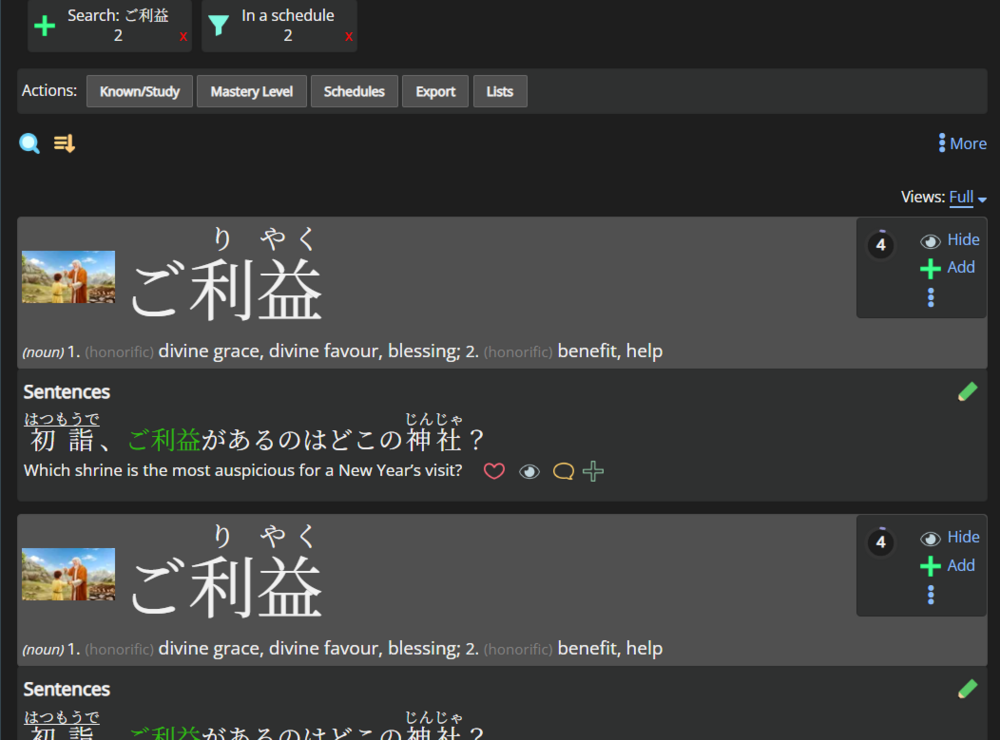
In that case, it'll help to list out a few of the duplicates, as well as screenshots with where you are seeing them.
I think my input wont be super helpful with this since I just added every renshuu made lists (not just n5-n1 but also textbooks) into my 1 single schedule so Im not super sure where the words are coming from at this point 😅
this for example just stuck with me since I got both of them on the same day, I believe this couldve been from N1? but yh I added and removed and added back the default schedules a few times until I was happy so its all a bit mixed up with the order of what list was added before others :/ I just know I had 1 week here I had a lot of duplicates which made me really notice it.
On the merge page, did you do the expanded options, or the "let renshuu take care of it?" renshuu will not touch user-made schedules (on that page), just the renshuu made ones.
On the merge page, did you do the expanded options, or the "let renshuu take care of it?" renshuu will not touch user-made schedules (on that page), just the renshuu made ones.
oh right I remember now after looking at it again.
i only tried the first root on because I was confused on how the checklist worked on the 2nd option. the wording seems kinda unclear.
[ ] [√] nothing happens
[√] [√] the word gets merged to the main word
[√] [ ] nothing happens?
[ ] [ ] nothing happens
is that understanding correct? is there not a way to fuse into the alternate version over the main word?
sorry for not mentioning it before my ADHD made me forget 0.1 seconds after leaving the screen xd